Skip to content
View in the app

A better way to browse. Learn more.

Wanderers Ways. Neil Thompson 1961-2021

A full-screen app on your home screen with push notifications, badges and more.

To install this app on iOS and iPadOS
  1. Tap the Share icon in Safari
  2. Scroll the menu and tap Add to Home Screen.
  3. Tap Add in the top-right corner.
To install this app on Android
  1. Tap the 3-dot menu (⋮) in the top-right corner of the browser.
  2. Tap Add to Home screen or Install app.
  3. Confirm by tapping Install.

Site Upgrade

you may have noticed things look different

the site has been due an upgrade for a while, but needed to be done manually on the server

so been waiting on the IT company to do it

looks like they kicked off the process

then I found I then needed to click a button in the admin to continue

and some bits may have timed out and not updated properly

so if it breaks on you, let me know

they may also send an invoice for their time

will let you know if they do

  • Replies 118
  • Views 5.8k
  • Created
  • Last Reply

Top Posters In This Topic

Most Popular Posts

  • Jol_BWFC
    Jol_BWFC

    It’s still there, but the blue star/dot is tiny, so it’s hard to actually click on it. Keep missing it and get taken to the first page. It would be good if that could be made bigger.

  • donkeyshorn
    donkeyshorn

    Touch the light bulb. Very bottom left of the page.

  • renewed wanderersways.com for the next 5 years - £115 leaves £425 in the pot

Posted Images

Featured Replies

if you rub a balloon on it first it works a treat

15 hours ago, Zico said:

if I click "select files to upload" it lets me do a new one

if I click the folder it gives me previous images I've uploaded

I'm on android using chrome

if you're clicking on select files and it shows you previous files it might be a phone / browser issue?

It worked fine initially. I posted the pictures of my dog. Then it stopped.

On 27/06/2026 at 21:00, Tonge moor green jacket said:

If I tap the little paper clip icon it takes me to a means of insertion, but won't then allow anything to upload.

Me too .

Im so dumb that I actually just took a screen shot to post on here to show people what I can actually see ......and then I realised !!!!

@Marc505 @Krimzon

Type something first then tap ‘Select files to upload’

I just tried to insert a photo without typing anything and encountered your problem

Test pic.

Nope doesn't work, even after typing first sentence.

Still same error message and file unable to upload once selected.

31 minutes ago, Tonge moor green jacket said:

Test pic.

Nope doesn't work, even after typing first sentence.

Still same error message and file unable to upload once selected.

Ditto . Very strange how it only affects some of us . Which one of us is a Tech God ?

12 hours ago, Tonge moor green jacket said:

Test pic.

Nope doesn't work, even after typing first sentence.

Still same error message and file unable to upload once selected.

Baffles me then. Works for some but not others

Tried deleting some photos from the "library" but nowt changed.

I was going to post a picture of a right nice pair of tits. Ah well.

Are people not seeing this

This is on a tablet, desktop view

Screenshot_20260630-212224_Samsung Browser.jpg

Nope . Im using a desktop . I have the top half of the screen but not the bottom half .

A click on the "plus" icon gives me a drop down box with options : ordered list , Bullet list , code block , Box, spoiler , quote, horizontal rule and table .

A click on the "chain" icon 8th from left , gives me a drop down box with 2 options : to enter text or enter url .

No other icon gives me the paper clip "Drag Files here to attach......" option .

Also under that I have the follow topic option to click but not the Hide option . I dont know if that is relevant .

Also the drag and drop , or cut/copy & paste dont work with pics but do with external links i.e. YouTube.

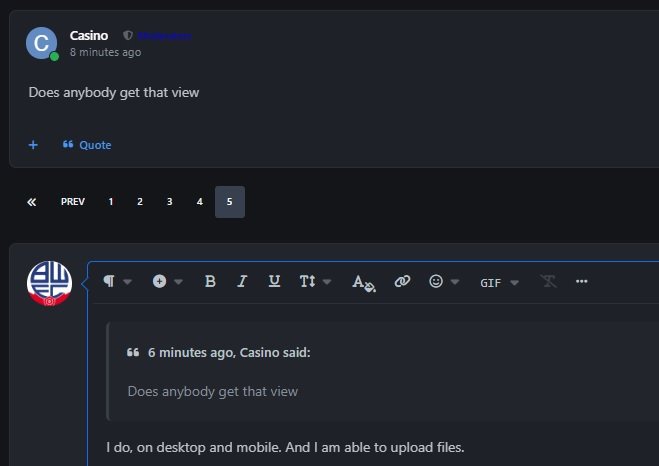
6 minutes ago, Casino said:

Does anybody get that view

I do, on desktop and mobile. And I am able to upload files no problem.

ergerger.jpg

On 04/06/2026 at 22:11, normski2 said:

is there any way of changing the font colour?

Ive just had a play

Im going to log in as you and check

No joy

But i think ive added some functionality

Click your name

Account settings

Content preferences

You can play with views

Im trying to give the ability to do more with themes but not got it yet

Test Pic ......

BWFCPROG1.jpg

Excellent .

I now get the screen that everybody was taling about , when you click on the quote button .

It has just happened today and I have no idea why . I havent done anything other than a complete clean up of all my old data , cookies , cache , unused progs etc . and a hard reboot .

It seems more likely that it was something done this end .

Join the conversation

You can post now and register later. If you have an account, sign in now to post with your account.
Note: Your post will require moderator approval before it will be visible.

Guest
Reply to this topic...

Account

Navigation

Search

Search

Configure browser push notifications

Chrome (Android)
  1. Tap the lock icon next to the address bar.
  2. Tap Permissions → Notifications.
  3. Adjust your preference.
Chrome (Desktop)
  1. Click the padlock icon in the address bar.
  2. Select Site settings.
  3. Find Notifications and adjust your preference.